Showing posts with label Images. Show all posts

Monday, December 22, 2008

Merry Christmas + Wallpaper!

Whoa! It's Christmas! And this is my *fifth* Christmas post! What with all this stuff supposedly going on in my life you'd think I have better things to do than post on a blog all week. What is this "work" thing I've gotten myself into, you ask? I seem to be spending all my time with it you say? It's starting to sound like some weird cult? :o What? What have my parents go to say about my dedicating so much to this "work" thing?

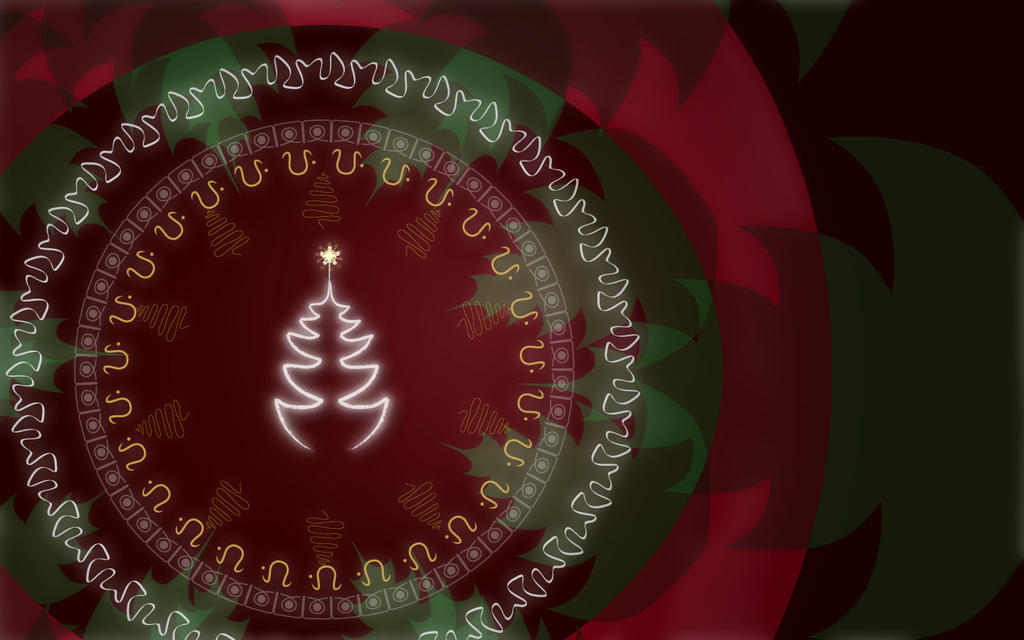
Well anyway, since I won't be posting again this season, Merry Christmas to everyone! Here's a chrismassy wallpaper(1440x900), in case you get a toilet brush or something in your stocking.


Full size -
http://thejester100.deviantart.com/art/Christmas-Wall-107009100

Monday, December 1, 2008

How To Creep Out Your Friends With Pictures

I realize many of you still don't know about this, so here's a way to figure out which camera/phone make and model was used to take a digital image. Seriously, you can creep people out and claim that you dabble in stalking too, with this little neato trick. All that is needed is windows.

Right Click image of choice > Properties > Summary > Advanced and viola. Click link for larger image.


This is for Win XP. Vista users can go figure it out for themselves. And mac users shouldn't be using digital cameras. And linux users probably already have a homemade util to find how, when and where a picture was taken, not to mention the ability to find out the person's mother's maiden name, his father's drinking habits and the number of his girlfriend.

Oh, and if you want to remove this metadata from an image, the easiest method is to copy and paste it into Paint. Then save it as a different file. But this results in quite a bit of quality loss. Or you could use photoshop's "Save for Web" dialog. There's probably some utility on the internet that will remove this stuff on batches of images too.

Oh yeah, don't mind the mess of icons.
:P

Friday, November 14, 2008

New Logo

A post-modernistic look at some popular social networking/bookmarking site logos. Has received much praise from many quarters.

STFU by ~thejester100 on deviantART


While you're at it, check out the rest of my stuff up there too. :D

Monday, October 13, 2008

The Jester's Theory of Poya Days

I've had a lot of time to think these days, and I am quite sure that I have stumbled upon a... breakthrough, in the field of social behaviors and history.

My theory is concerning Poya Days, or full moon days when we Sri lankans all get a holiday, and why we have them. Well, here it is :

Many thousands of years ago, back when Buddhism was just arriving, there lived a clan of werewolves in Sri Lanka. There were also regular humans around, as you might have been taught.

Now, these two "factions" could have lived in harmony if not for the fact that werewolves love kurakkan. And the villagers had it in abundance.
Also, the werewolves were at their most powerful during the full moon. Therefore, to protect themselves from the werewolf menace, the villagers built mini-forts and holed up in these dome shaped structures(Because everyone knows werewolves hate domes) and waited out the full moon with their kurakkan safely stored in the forts.

And so eventually the werewolves died of starvation since they couldn't get any kurakkan.

That is, in it's entirety, my theory on why we have poya days.

Below is the evidence -

Notice the rising sun, commonly seen in sunny paradise isles like ours. Also the distinctly tropical trees in the background.


And the final piece of evidence -

Convincing, innit?

Monday, May 5, 2008

India!

Hello All!

I’ve been away for a while, but rest assured that I enjoyed every minute of it! :p Anyway, Here’s some captioned pics I took. To explain the whole trip word by word would be too much like forcing you to watch the endless slide shows of vacation pictures on my hard drive. Since I haven’t got a kick out of torturing my audience in a long time, I’ll just provide the pictures. Most of them can be clicked for enlargements.


This is more or less the India that I remember most from my last trip there. The Ambassador taxis. When I was a kid I thought it was the bomb! (Who says 'the bomb' anymore these days eh?) You could fit about 7 people in one, and it had nice 'cushiony' seats. This time over, I went just once in one of these, and it wasn’t very pleasant. Too hot and bumpy. It was hot enough to melt the deodorant right out of my armpits. But newer locally made cars seem to overcome this problem, by switching the A/C to “Blizzard” mode when started, then carrying on at a more sedate pace.


The beach! Holy land for many a temperature-challenged person! Or maybe even many a thirsty old man. When I initially decided to go to the beach, it was 12 noon. Now, many years of comic books and Bay-Watch-ish programming on TV has instilled in me the idea that the beach was a place for any time of day. Need a run in the morning? The beach. Need to cool off after a grueling day at school? Need to chill after a hard day’s work? Need a place to bury a corpse in the night? Anyway, my midday soirĂ©e was cut off at the pass by my mother who shouted in astonishment whether I was insane going to the beach at noon. Apparently it was the devil’s fryer at this time of day. I finally managed to get out at about 3pm. Windy, salty and completely deserted! Awesome strip of beach.


Last time I went, the railway station looked more or less like the Fort station. Concrete floors, dirty walls with peeling paint, and urchins sitting around staring at tourists. But man, have things changed. Now I know what they were talking about when they said India’s developing, fast, on CNN. One thing that would have led to this, I think, was sponsorship. Advertisements were plastered all over the place. In the station, on the stairs, in the trains, and they even had these screens inside the trains which were showing a sort of mini TV station broadcast just for the railway service. This too had many ad spots.


Some Chinese fishing net thing. They lower the net side into the water, then raise it up using the counterweights on the other end. I doubt they use these even in china now.


Just checking how far the zoom on the camera worked :) . The blocky ness is due to digital zoom. But, 12x seems pretty decent. I’m stuck with this compact till I get a job.


This is in Cochin. A fraction of it, actually. Take that picture, and multiply by 100 and you’ll have an idea of what it looks like now. Unfortunately I couldn’t carry the camera around while we were driving around, so no cityscapes or anything. But on the bright side, without a camera, I blended in nicely as just another local. But when it came to talking, I stuck out like a sore thumb with my accent. Most shopkeepers smiled and asked whether I was from SL, or just looked a bit puzzled. But all in all, shopping around was interesting. Three assistants introduced themselves to me in the same store, going from section to section.


Amusement park was truckloads of fun, with all sorts of rides. From rollercoaster’s water rides. I finally discovered why people scream in rides. Yes, this rock crushing demon bashing specimen of man was screaming his head off. But the problem with a water park is, while you’re going on the rides, you can’t take pictures without your camera meeting it’s maker in a watery grave.


More experiments with the camera. That’s my cousin on the left, “handling” his hair. My cousin and his family spent about four days going about with us, which gave us the opportunity to say whatever the hell we want in Sinhalese, knowing no-one else understood. Thankfully, we didn’t run into any tour-guides.


The collage! Click for enlargement!What collection would be complete without it? Some of the Flora and fauna, and some buildings. The cat’s my aunt’s. And yet again, I find that this camera is very satisfying when used in macro mode. 2cm is close enough to see every detail in anything.


There you have it, folks. My entire trip vaguely outlined with pictures.

Saturday, March 15, 2008

Adobe Illustrator!

For the better or for worse...

Tuesday, January 15, 2008

Try and guess what car this is...

The latest fruit of my labours in Cinema 4d and Photoshop


I can't believe I just realized 3d models could be rendered to fit into photographs...


Heres a pic of the car as it was first made

Sunday, December 16, 2007

Merry Christmas!

Merry Christmas People! Here's my card to you -


Another year comes to an end... ... I'm trying to think of something meaningful to say, but, true to form, my mind's wisdom generator fails me at the most (in)opportune moments.

Anyway, As the more perceptive of you might have noticed, Christmas is going downhill. I remember when I was small when we used to go shopping for all sorts of things during Christmas season. From new decorations, even if they're not really needed, to speacial food. Now, each of us usually does our own small scale purchasing at Christmas.

But, ever the optimist(most of the time :-) ), I keep hoping for some sort of relief. Be it either moving out, or a revolution of some kind(fat chance).

But this is not the time to dwell on such things! Christmas is not about buying things is it? Enjoy the season for what it is!

Have a merry Christmas!


.... Christmas is waaaayyy too commercialized.

Also consider -

Wednesday, December 5, 2007

How to clean photographs using Photoshop - Tutorial

How to touch up your photographs in Photoshop


Here’s a basic tutorial on cleaning up your images using Photoshop CS2. The procedure should be the same for Elements, too, I think. I hope this will be useful when trying to make something out of those millions of images you shot while on vacation of cars, trees, dust, sky, water, trees and cars.
Step 1

Open the image to be edited in Photoshop. I’m sure you all know how, but just in case Suraaj is reading, Go to File>Open. :-)

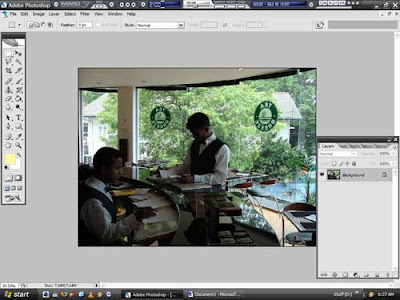
Now, Close all the unnecessary panels in Photoshop. You can do this by clicking on the little x at the top right of each box. Do so for all except the Tools and Layers boxes, since you won’t be needing the rest for this “operation”. So it will look something like this.

Step 2

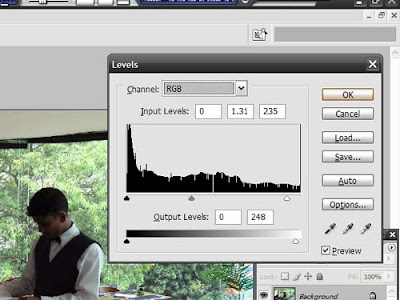
Now, the first thing to do is to press “Shift+Ctrl+L”(Or if you like the hard way, Image>Adjustments>Auto Levels). This will invoke the “Auto Levels” feature, which will try and predict what the picture’s overall colour is supposed to look like. If you don’t like what it does, simply press “Ctrl+Alt+Z”. Now, press “Ctrl+L”. This will bring up the manual Levels adjustment box, which looks like the one below. Mess around with it till you get a satisfactory look in your image. As you might see, dragging the things under the graph and at the bottom will reduce and increase the contrast and brightness in the image. Also, you can do this for each colour too. Experiment.


Step 3

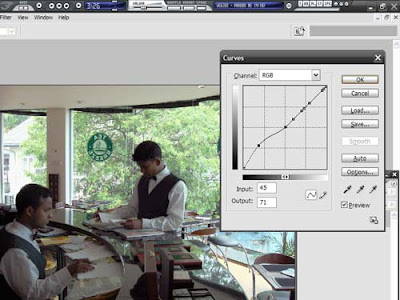
Press “Ctrl+M” to bring up the “Curves” dialog. This will let you increase and decrease the brightness of select parts of the image. To do so, while the box is open, hold “Ctrl” and click on the parts of the image where you think the brightness is enough already, for example the sky, or a window in a room. Each time you click, a small dot will appear on the graph, holding that position. Then, click on a part of the curve, and see what happens. After a while, you’ll get the hang of it, and be able o adjust the thing so that jus the dark bit in your image are given some light. If you have, overall, a bright picture, then the process is reversed. i.e., “Ctrl”+click the dark areas.
Step 4


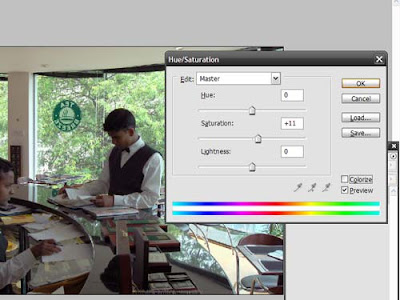
Saturation – Press “Ctrl+U” to bring up the Hue & Saturation dialog. This lets you alter the “freshness” of the image. Click on the slider under “Saturation” and slide away. Big alterations are not recommended unless you want people to look like tomatoes. Usually, +/- 10 works. You can play with the Hue if you want your subjects to appear alien like and display a range of comic book emotions, like jealousy(100) and anger(-30). What it does is, it replaces colours with different ones, as shown in the bar below the sliders. Or you could just click “Colourize”, and see what happens!


Step 5


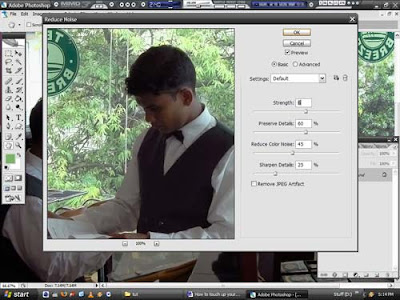
Noise is common, and no one likes it, unless it’s blocking horrible music. To get rid of it, Click on “Filter>Noise>Reduce Noise…”. Then, Slide around till you get something you like. But try and stay away from the “Remove JPEG artifact” checkbox. In nearly all the images I’ve used it on, it just interprets all objects as noise, and goes forth blurring them. After you get something you like, click Done and take a look at what’s become of the image.


Step 6


If you want to do more, like clean up people’s faces, use the lasso tool to select the faces (Press L and then click and drag around the faces). You don’t have to get the lasso around perfectly. A rough shape will do. Then Right-click on the selection and click “Feather”. Enter a value of about 8 for a four mega pixel image. You’ll see what it does in the image below.
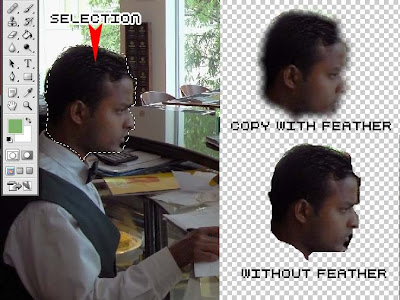


Then, copy that face by pressing “Ctrl+C”, and paste it again using “Ctrl+V”. This will make the face appear in its own layer. This means it can be manipulated separately. Imagine it as shapes made of paper, one on top of the other. Copy and paste various other objects you want to edit separately into more layers. You can rename these layers, for ease of use by double clicking on the layer name in the “Layers” palette(Default names are Layer 1,2 and so on).
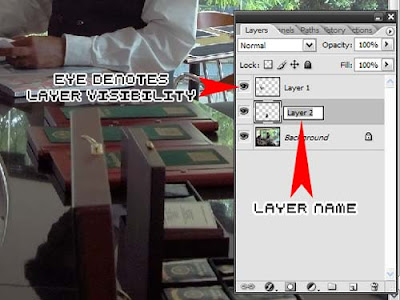


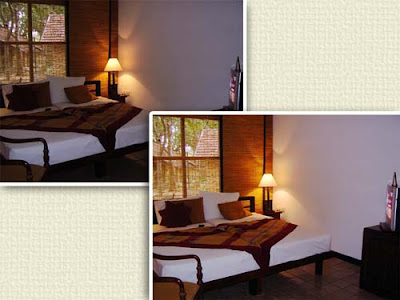
Now that you have your objects in separate layers, use some of the tools described above on your disembodied faces. For example, you might want to emphasize a certain magazine in the image, and so you can make it more visible. To see if your work has made the image better or not, keep clicking on the little eye icon next to the layer names, to make the layers visible and invisible. Doing so will let you see whether the modifications are beneficial, or if the face still looks like the one it was originally.
Here are some examples of images done up –


Hotel Room-
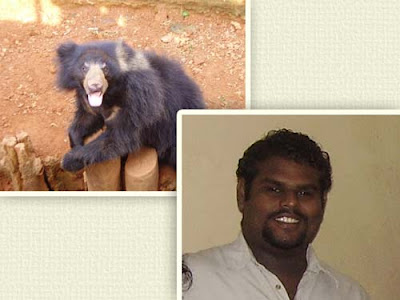
Yala-Sloth Bear in Dehiwala-
Just as a note, The end result of the above image can be found at http://lame-duck.com/, and runs a pretty interesting forum.

---------------------------------------------------------------
Well, that’s it for now folks! If I can make myself get round to it, I’ll make another on using the Rubber Stamp tool. “Why would I want to stamp my pictures with purple ink?” you ask? Well, It’s a wee bit different in Photoshop y’see…

Wednesday, October 10, 2007

Good Art on display. Look at it.

The latest fruits of my brief labours. Whaddaya think?

Friday, August 24, 2007

Yala Ahoy!

I went to Yala. And some other places. Nuwara Eliya, Bandarawela and Kataragama to be precise. Can't think of any interesting opening lines, so just check out the images.

WARNING : Amateur Photography ahead.

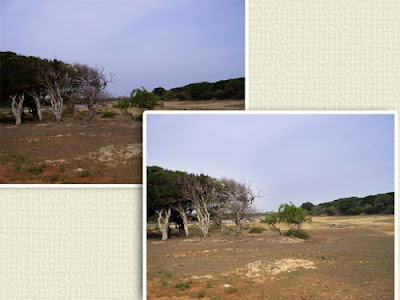
Trees in Yala, Also Shadows in Yala.

Leopard in Yala. Apperently they're quite rare. Not too surprising seeing the way they pretend you don't even exist when you drive by...

No points for guessing what's hidden in the trees. Sunset in Yala. Self explanatory.
Nuwara Eliya -

One of the humongous Bulls I saw at the Ambewela Farm.Neck looked about 2 feet wide. And no sir, Ah suuure din not see any "Photography is Prohibited" sign.
Kataragama-

Some of the local apes in Kataragama. Sacred, none the less.

One of the less camera shy dieties in Kataragama. Most of the others were recluses, who'd ordered they're priests to shoo away any tourists carrying cameras.

All in all, it was pretty interesting. Although it WAS a little strange going from extremely cold to extremely dry in a span of five days.
Random thoughts -
* People in Nuwara Eliya can easily spot outsiders by looking for people who are in summer clothes and are usually shivering.
* Horses bump up and down waaaayy too much.
* Everything is sacred in Kataragama. Even down to the hotel food, which was depressingly vegetarian. I was a little dissappointed. I was expecting throngs of people rushing around, and when I finally roamed around the city, I had a hard time finding what the actual "town" was. When I got there, it was more or less deserted other than for the millions of pavement hawkers trying to sell us plates of fruits and veggies.

Wednesday, July 4, 2007

It's Alive! It's Alive!

Yes! They are alive! Here are a couple of renders on Cinema 4D and some Photoshopped images, created by yours truly. They're a random pick from the bunch on my desktop.

What better to open a post with than an oil lamp? Anyway, It's low poly because it was originally meant to be rendered from far away, as part of a whole room. But the chrome on the base just looked too good to be ignored!


Some truly cruel photoshopping... Why cruel? It's the Elder's Home next to our school, which can be conveniently photographed from our class. The fire on top looks a little..... funky, to say the least.


Can someone think of some better text for this thing? The render just looked too nice to be empty, so I just put the text...


I love This! My current wallpaper. Does this mean I'm yearning for my childhood playthings?


For all you Radeon card users out there! (Will I get sued for using their trademark?)


A dispenser of some sort.... Don't Know what. Yet...


My first Car!!!!


My first Car 2...Ignore the purple thing in the background.


The lamp... No comment.